QLMCRM: The All-in-One Customer Acquisition and Business Growth Platform for Modern Businesses

All-in-One CRM & Customer Acquisition Platform

Running a successful business requires more than finding new customers. You need an effective way to capture leads, manage customer relationships, follow up with prospects, automate marketing, organise sales activities and turn opportunities into paying customers.

Unfortunately, many businesses rely on several disconnected software subscriptions to manage these activities. They might use one platform for email marketing, another for appointment scheduling, a separate CRM, additional software for automation and yet another system for customer communications.

This creates unnecessary complexity, increases operating costs and makes it harder to manage the entire customer journey.
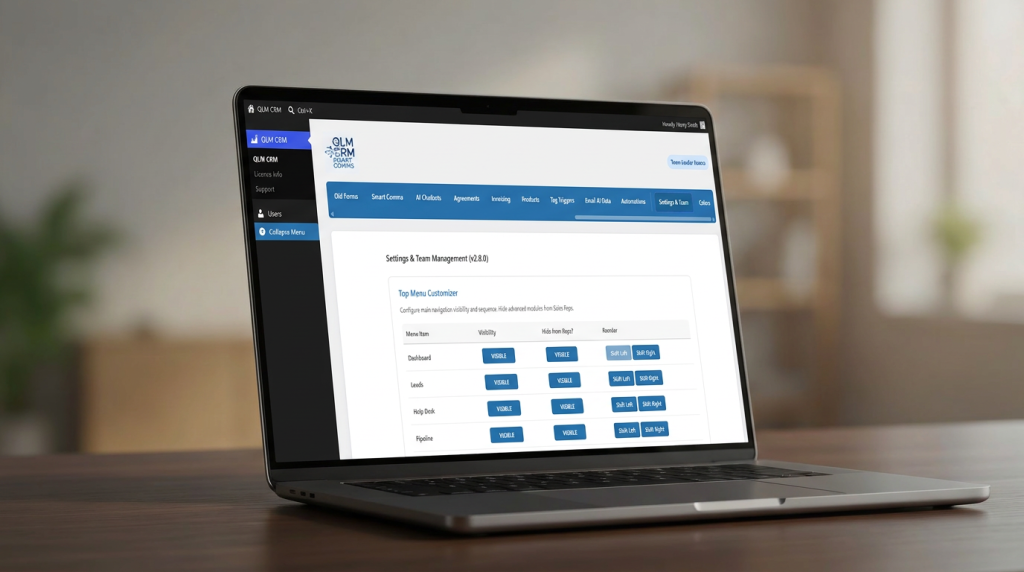
QLMCRM

QLMCRM provides a smarter alternative. It is an integrated customer acquisition, customer relationship management and business growth platform designed to help small businesses, marketing agencies, coaches and consultants manage more of their sales and marketing activities from one central system.

What Is QLMCRM?

QLMCRM is an all-in-one CRM and customer acquisition platform that helps businesses manage their leads, customers, sales pipelines, marketing activities and business communications.

Rather than constantly switching between different applications, businesses can use QLMCRM to bring essential sales and marketing processes together.

The platform is designed to support the customer journey from the first point of contact through lead nurturing, appointment booking, sales conversion and ongoing customer engagement.

Whether you operate a small business, run a marketing agency, work as a coach or provide professional consulting services, QLMCRM gives you a centralised environment to organise your customer acquisition and relationship management activities.

Why Do Businesses Need an All-in-One CRM System?

One of the biggest challenges facing modern businesses is managing information across multiple software platforms.

When customer information is spread across different systems, important opportunities can be missed. Sales teams may struggle to track conversations, follow-ups can be delayed and business owners may not have a clear picture of their sales pipeline.

An integrated CRM system helps solve these problems by bringing important business information and processes together.

Here are five reasons businesses benefit from using a platform like QLMCRM:

  1. Centralised customer management: Keep customer and prospect information organised in one place.
  2. Improved lead follow-up: Manage enquiries and sales opportunities more consistently.
  3. Better sales visibility: Track prospects and understand where they are in the sales process.
  4. Marketing efficiency: Bring customer engagement and marketing activities into a more organised workflow.
  5. Business productivity: Reduce the need to switch between multiple disconnected applications.

The objective is simple: spend less time managing software and more time building customer relationships and growing your business.

What Can You Do with QLMCRM?

QLMCRM is designed to support multiple areas of business sales, marketing and customer management.

1. Manage Leads and Customer Relationships

Every new enquiry represents a potential business opportunity. However, capturing a lead is only the beginning.

Businesses need a reliable way to organise contact information, monitor conversations and manage follow-up activities.

QLMCRM helps bring lead and customer management into one central environment, making it easier to maintain visibility over your prospects and customer relationships.

2. Organise Your Sales Pipeline

A structured sales pipeline helps businesses understand where opportunities stand and what action should happen next.

Instead of relying on spreadsheets, scattered notes or memory, businesses can use CRM processes to organise prospects and monitor their progress.

This makes it easier to identify opportunities, maintain consistent follow-up and understand how potential customers move towards becoming paying clients.

3. Automate Marketing and Follow-Up

Following up with prospects is essential, but manually managing every interaction can consume valuable time.

Marketing automation helps businesses create more consistent customer engagement processes. Depending on the features and configuration being used, workflows can support activities such as lead nurturing, reminders, communications and follow-up sequences.

By reducing repetitive administrative tasks, automation gives business owners and sales teams more time to concentrate on conversations that move opportunities forward.

4. Improve Customer Communication

Customers expect businesses to respond promptly and communicate professionally.

QLMCRM brings customer relationship management and communication capabilities into a connected business environment.

For businesses requiring additional communication functionality, the optional Smart Comms add-on provides AI voice sales agents, inbound and outbound calling, an intelligent AI switchboard, live call transfers, two-way SMS and WhatsApp communication, and local telephone numbers in supported countries.

Smart Comms also includes Company Brain AI training capabilities to help configure AI agents around business information.

This optional add-on is available for an additional $99 per month.

5. Support the Complete Customer Journey

A successful business needs more than a contact database.

It needs a process for attracting attention, capturing enquiries, nurturing prospects, arranging conversations, converting opportunities and maintaining customer relationships.

QLMCRM is designed to help businesses manage more of this journey through one integrated platform.

The result is a more organised approach to customer acquisition and business development.

Who Is QLMCRM Designed For?

QLMCRM can support a range of businesses and professional service providers.

Small business owners: Organise leads, manage customer relationships and create more consistent sales processes without relying on numerous disconnected applications.

Marketing agencies: Manage client acquisition and customer relationships while building a more structured approach to marketing and sales operations.

Coaches and consultants: Capture enquiries, organise prospects, manage appointments and maintain communication with potential and existing clients.

Growing businesses: Introduce more organised CRM and marketing processes as customer numbers and sales activity increase.

Whether you are working independently or managing a growing team, having your customer information and sales activities organised can make day-to-day business management easier.

QLMCRM Pricing: Choose a Plan That Fits Your Business

QLMCRM offers subscription options designed around different contact list sizes and business requirements.

The published plans include:

Plan Monthly price Contact capacity
Pro $59 / £54 Up to 10,000
Growth $119 / £107 Up to 25,000
Scale $239 / £215 Up to 50,000
Enterprise Custom quote 100,000+

UK prices shown include VAT. All three standard subscription tiers include the Premium Core suite. Enterprise options are available for businesses requiring larger-scale capacity and tailored infrastructure.

The optional Smart Comms add-on is available for an additional $99 per month.

Businesses can choose a plan based on their contact requirements, current operations and growth objectives.

How Can QLMCRM Help Your Business Grow?

Business growth is not simply about generating more leads. It is also about improving how effectively you manage the opportunities you already have.

If enquiries are not followed up, prospects are forgotten or customer information is difficult to locate, valuable opportunities can be lost.

A well-organised CRM system helps address these challenges by creating greater visibility and consistency across sales and customer management activities.

With QLMCRM, businesses can work towards:

  • Improving lead organisation and management.
  • Creating more consistent follow-up processes.
  • Maintaining better visibility of sales opportunities.
  • Bringing customer communications into a connected environment.
  • Reducing repetitive administrative work through automation.
  • Supporting customer retention and ongoing engagement.
  • Building more organised and scalable business processes.

QLMCRM is not a guarantee of increased revenue. Results depend on factors such as your marketing strategy, sales processes, customer demand, implementation and how effectively you use the platform.

However, having the right systems in place can provide a stronger operational foundation for business growth.

Frequently Asked Questions About QLMCRM

What does QLMCRM stand for?

QLMCRM is the name of QLM Business Solutions’ integrated customer relationship management and customer acquisition platform.

Is QLMCRM suitable for small businesses?

Yes. QLMCRM offers a Pro plan designed for smaller operations, including solo coaches, independent consultants and boutique agency owners. Its larger plans provide additional contact capacity for growing businesses.

Can marketing agencies use QLMCRM?

Yes. Marketing agencies can use QLMCRM to organise leads, manage customer relationships and support their sales and marketing operations.

Does QLMCRM include marketing automation?

QLMCRM includes CRM and marketing capabilities designed to support more organised customer engagement and business workflows. The available functionality depends on the subscription and configuration.

Does QLMCRM offer AI communication features?

Yes. The optional Smart Comms add-on provides AI voice sales agents, an intelligent AI switchboard, live call transfers, two-way SMS and WhatsApp, supported local telephone numbers and Company Brain AI training capabilities.

How much does QLMCRM cost?

The Pro plan starts at $59 per month or £54 per month, including VAT for UK customers. Growth costs $119 or £107 per month, and Scale costs $239 or £215 per month. Enterprise pricing is available on request.

Where can I find out more about QLMCRM?

Visit the official website at https://qlmcrm.com/ to learn more about the platform and its available plans.

Take Control of Your Customer Acquisition with QLMCRM

Your business deserves more than a collection of disconnected applications and complicated processes.

QLMCRM brings customer relationship management, lead organisation, sales processes, marketing capabilities and optional AI-powered communications together in one business platform.

If you want to spend less time switching between software, improve the way you manage prospects and build a more organised customer acquisition system, QLMCRM is worth exploring.

Discover how QLMCRM can help your business organise, market, sell and grow.

Visit www.QLMCRM.com to explore the platform and find the subscription option that fits your business.

I need a Real Estate CRM that can grow with me

My current setup has worked really well for one reason: I was the only person using it.

I’ve been working from a spreadsheet that I built myself, with MailerLite handling some of my automations, landing pages and website-related marketing. For a solo agent, it has honestly done the job.

But I’m starting to outgrow it.

I’m bringing someone on to help as an ISA/TC, and suddenly I’m thinking about things that weren’t a problem when I was the only person touching the database.

Who is following up with which lead?
When was the last contact?
Who is supposed to call this person next?
How do we make sure nobody gets forgotten or contacted twice?

When I was on a team, we used Follow Up Boss, and I genuinely liked the Smart Lists. I had different lists for hot, warm and cold buyers and sellers, as well as follow-up lists based on how often someone needed to be contacted, such as every 7, 30 or 60 days.

That’s the functionality I don’t want to lose.

At the same time, now that I’m building my own setup, I’m wondering whether there is something that gives me the same kind of organisation while also bringing more of the stack together.

An IDX website and dialler would be useful, and email functionality would be a plus.

Lofty looks like it checks a lot of boxes, but the price is difficult to swallow for where I am right now.

So for agents who have gone from solo to small team, what CRM did you grow into?

Did you go back to something like Follow Up Boss because the CRM itself was better, or did you choose an all-in-one platform to reduce the number of separate tools you were paying for?

I’m not particularly interested in AI features. Smart follow-up, good lists and a system that won’t become a headache when my team grows matter much more to me.

My Answer:

From Solo Agent to Sales Team: How to Build a Scalable Real Estate CRM System in 2026

By Henry Smith

For a solo real estate agent, running your business on a custom spreadsheet and a standalone email tool like MailerLite or Mailchimp can feel surprisingly effective. You know every buyer’s timeline, you remember which seller prefers morning phone calls, and all the moving pieces live safely inside your own head.

Then, your business grows.

You hit the point where you need leverage. You hire an Inside Sales Agent (ISA) to work your cold leads and handle initial outreach, or a Transaction Coordinator (TC) to manage disclosures, inspections, and escrow paperwork.

The moment a second person touches your database, the “spreadsheet system” collapses.

Suddenly, you are faced with operational challenges you never had to worry about as a solo producer:

  • Who called this seller last, and what was discussed?

  • Did the ISA follow up with the relocation buyer, or did they fall through the cracks?

  • How do we make sure an agent and an ISA don’t accidentally call the same high-value client on the same morning?

  • How do you let an assistant work your leads without giving them complete access to export your entire database of sphere-of-influence contacts?

When agents hit this inflection point, they often think their only choice is signing a multi-thousand-dollar annual contract for heavy, enterprise real estate platforms like Lofty or kvCORE.

In 2026, there is a much cleaner, more cost-effective way to scale a real estate team.

Here is the exact framework for building an organized, zero-leak real estate system from the ground up.


The Core Breakdown: Why Spreadsheets Fail Teams

When you transition from a solo agent to a team leader, your software must change from a static record into an active operational queue.

In a manual setup:

  1. The Double-Touch Risk: Without real-time activity logging, two team members end up reaching out to the same lead with conflicting messaging.

  2. The “Static Email” Problem: Standalone email marketing tools don’t talk to your daily call logs. If your ISA speaks to a buyer who says “I just bought a house yesterday,” that contact remains on your automated marketing drips unless someone manually updates three different spreadsheets.

  3. Data Security & Privacy: As a team leader, your database of past clients and sphere of influence is your primary business equity. You need staff to work incoming leads without giving them the ability to download your master database.


The 4-Pillar Real Estate Team Architecture

To scale cleanly without drowning in administrative chaos or expensive software fees, your team needs an unbroken workflow across four core pillars:

Text
┌─────────────────────────────────────────────────────────────┐
│             THE REAL ESTATE LIFECYCLE ENGINE                │
├─────────────────────────────────────────────────────────────┤
│ 1. SMART ORGANIZATION: Dynamic Buyer & Seller Tiers         │
│ 2. SCOPED TEAM ROLES: Protected Queues for ISAs & Agents    │
│ 3. VISUAL DEAL PIPELINES: Active Escrow & Showing Stages   │
│ 4. CLOSING & CONTRACTS: Integrated Digital E-Signatures     │
└─────────────────────────────────────────────────────────────┘

Let’s examine how each pillar functions in practice.


1. Replicating the “Smart List” Model (Tiered Segmentation)

Top-producing teams organize their database based on urgency and contact frequency, not just generic alphabetical lists:

  • Tier 1: Hot / Active (3–7 Day Cadence): Active buyers with pre-approvals and sellers preparing to list. These contacts are managed on a visual board.

  • Tier 2: Warm Prospects (30–60 Day Horizon): Segmented using dynamic tags (e.g., Buyer-Spring2026, Downsizing-Seller, Relocation).

  • Tier 3: Long-Term Sphere & Past Clients (90-Day Cadence): Enrolled in automated, background email sequences that deliver local market updates and seasonal home maintenance guides so you remain top-of-mind without manual effort.


2. Scoped Sub-Accounts: Protecting Your Database

When you hire an ISA or administrative assistant, they should not be overwhelmed by your entire business history.

  • The Lead Wall: Inside QLMCRM, team leaders can create Scoped Sub-Accounts. Your ISA logs in and sees only the specific lead queue assigned to them for the day.

  • Master Visibility: As the team leader, you maintain the master view across the entire organization. You can review call recordings, check logged notes in real-time, and reassign hot leads to closing agents with one click.

  • User Impersonation: Leaders can “Login As” any team member to review their active tasks, verify their follow-up schedule, and provide 1-on-1 coaching without sharing passwords.


3. Visual Transaction Pipelines (Kanban Deals)

Real estate deals involve dozens of moving parts. A flat list makes it impossible to see where transactions are stalling.

A Visual Kanban Pipeline transforms your business into clear, drag-and-drop stages:

  • Buyer Pipeline: New Inquiry ➔ Buyer Consultation ➔ Pre-Approved ➔ Showing Homes ➔ Under Contract ➔ Closed Escrow

  • Seller Pipeline: Listing Lead ➔ CMA Sent ➔ Listing Presentation ➔ Active on Market ➔ Pending Sale ➔ Closed

Every deal card displays the property address, client details, and transaction value in real time, allowing team leaders to forecast upcoming commission revenue with total accuracy.


4. Closing the Loop: Built-in E-Signatures & Document Tracking

The biggest administrative bottleneck for an agent and Transaction Coordinator is managing disclosures, representation agreements, and client intake forms.

In disconnected setups, this requires paying for separate e-signature tools like DocuSign.

In a unified system like QLMCRM:

  • Standardized Templates: Create pre-approved client agreements, representation forms, and intake questionnaires with merge tags (like {first_name} and {company}) that auto-populate client data.

  • Mobile Signing: Clients receive a secure, branded link where they can review the scope and sign with their finger on their smartphone.

  • Permanent Timeline Archiving: Once signed, the document—complete with a cryptographic legal audit trail and timestamp—is permanently locked to the client’s CRM profile.


Evaluating Real Estate Software in 2026

When choosing a platform to grow your team, evaluate your options against these realities:

  1. Standalone Real Estate Suites (Lofty / kvCORE): Include IDX websites and dialers, but often cost $400 to $600+ per month, require rigid annual contracts, and come with complex features a 2-to-5-person team will never use.

  2. Pure CRMs (Follow Up Boss): Excellent for lead routing, but strictly a CRM. You still have to pay separately for landing page builders, email sequence tools, e-signature apps, and client portals.

  3. Unified Business Operating Systems (QLMCRM): Combines visual pipelines, automated email sequences, landing pages, digital agreement e-signatures, and white-label client portals under one predictable platform with zero per-seat penalties.


Summary: Scaling with Simplicity

Growing a real estate team does not require drowning in expensive software subscriptions or losing control of your database.

By establishing clear lead tiers, scoping staff workspaces, and unifying your pipeline from initial inquiry to signed contract, you give your team the organized foundation it needs to close more transactions with less friction.

Build a Scalable Real Estate System in QLMCRM

Stop managing disconnected spreadsheets and take total control of your team’s pipeline.

Experience the complete QLMCRM platform with our 30-Day Extended Free Trial (No Credit Card Required) at QLMCRM.COM. Your dedicated, private environment will be verified and provisioned within 24 hours.

QLMCRM.COM. One platform. One subscription. Total operational control.

Cloud-Based CRM Software for a Small Organization

How Small Community Organizations and Non-Profits Can Choose the Right CRM (Without the “Contact-Tier” Pricing Trap)

By Henry Smith

qlmcrm

Running a small community organization, charity, or non-profit in 2026 comes with a unique administrative challenge that traditional for-profit businesses rarely face:

You have a large contact database, but a very modest operating budget.

Think about your organization’s records. You have active donors, occasional supporters, weekly volunteers, local council contacts, past gala attendees, and hundreds of residents who signed up for your newsletter three years ago.

When you try to manage this community using spreadsheets and disconnected desktop files, things fall apart:

  • A major supporter donates, but the volunteer coordinator has no idea and forgets to thank them.

  • You spend three hours every month exporting CSV files from your database and importing them into Mailchimp just to send a community newsletter.

  • Event signups are tracked on paper or Google Forms that don’t talk to your financial records.

When community organizations realize their spreadsheets are breaking down, they look for a modern cloud CRM. But this is where they walk directly into the “Contact-Tier Pricing Trap.”

Here is why most CRMs fail community organizations—and how to set up an affordable, unified system that scales with your mission.


The “Contact-Tier Tax”: Why Standard Tools Hurt Non-Profits

Most commercial CRMs and email marketing tools (like Mailchimp, HubSpot, and Bloomerang) use a pricing model based on the total number of contacts in your database.

For an e-commerce brand where every contact represents high commercial revenue, paying $150 to $300 a month for 10,000 contacts makes sense.

For a community organization, it is disastrous:

  • If you have 5,000 local residents on your community newsletter list who only donate once a year (or simply volunteer their time), standalone software platforms will charge you enterprise-level fees every single month just for storing their email addresses.

  • You are effectively penalized for growing your community.

To keep your administrative overhead low, you need a system that does not charge you a penalty for holding a large, engaged community list.


The 4 Non-Negotiable Pillars for Community CRM Operations

A small community team doesn’t need a complicated enterprise sales tool with 50 complex features. You need a system that does four core operational tasks exceptionally well in one place:

Text
┌─────────────────────────────────────────────────────────────┐
│                 THE COMMUNITY CRM BLUEPRINT                 │
├─────────────────────────────────────────────────────────────┤
│ 1. Unified Supporter Profiles (Notes, History & Tags)       │
│ 2. Native Email Newsletters & Automated Welcome Sequences   │
│ 3. Branded Contribution Links & Instant Payment Processing  │
│ 4. Event Registration Pages & Embeddable Volunteer Forms    │
└─────────────────────────────────────────────────────────────┘

Let’s look at how each of these pillars functions in practice.


1. The Unified Supporter Timeline (One Source of Truth)

When a community member interacts with your organization, their history should never be scattered across three people’s personal email inboxes.

  • The Single Profile: Opening a supporter’s record should instantly show their complete chronological history: past contributions, logged phone notes from committee members, event attendance, and survey responses.

  • Intelligent Tagging: Easily categorize your database with tags like Active Volunteer, Major Donor, Gala 2026 Sponsor, or Newsletter Only, allowing you to pull targeted lists in seconds.


2. Eliminating the “Mailchimp Dance” (Native Email Newsletters)

The biggest time-waster for small organizations is managing a separate email marketing tool.

  • The Old Way: Exporting contacts from a database ➔ cleaning spreadsheet formatting ➔ uploading to Mailchimp ➔ dealing with duplicate records and broken unsubscribe syncs.

  • The Modern Way: Having built-in email templates and automated nurture sequences directly inside your CRM.

  • When you want to send a monthly community update, you draft it inside the CRM and broadcast it directly to your tagged segments. When a new volunteer signs up on your website, the CRM automatically delivers a 3-part “Volunteer Welcome Guide” over their first two weeks without any manual intervention.


3. Digital Contributions & White-Label Invoicing

Chasing community pledges or managing physical cash and checks takes valuable volunteer hours.

  • Branded Payment Portals: Generate a secure, white-label contribution or ticket invoice link that can be shared via email or text.

  • Instant Digital Settlement: Supporters can contribute using credit cards, debit cards, or digital wallets (like Apple Pay) via integrated Stripe or PayPal processing.

  • Automatic Record Keeping: The moment a contribution clears online, the transaction is automatically recorded on the supporter’s profile and logged into your financial reporting dashboard.


4. Custom Volunteer Forms & Event Landing Pages

To grow your community outreach, you need clean, professional lead capture tools that don’t require hiring a web developer.

  • Embeddable Forms: Easily place volunteer signup forms, petition forms, or contact forms onto your existing website.

  • Dedicated Landing Pages: Build customized, mobile-responsive event pages for fundraisers, seasonal cleanups, or charity galas.

  • Custom Domain Authority: Run all forms and portals under your organization’s own domain (e.g., portal.yourcommunity.org) to maintain high public trust.


Evaluating the Options: What Works Best?

When evaluating platforms for your community group, consider these three routes:

  1. Zeffy (Best for Donation-Only Workflows): Zeffy is 100% free because it asks donors for an optional “tip” at checkout. It is great for basic fundraising, but limited if you need multi-channel visual workflows, visual volunteer pipelines, or client portals.

  2. Dedicated Donor CRMs (Little Green Light, Bloomerang): Strong for formal grant tracking and historical gift accounting, but their pricing scales up rapidly as your contact list grows.

  3. Unified Business & Community Operating Systems (QLMCRM): Provides the entire operational suite—supporter management, visual pipelines, built-in email sequences, e-signatures for volunteer waivers, white-label invoicing for contributions, and event landing pages—under one predictable platform without per-contact pricing penalties.


Summary: A Professional Foundation for Your Mission

Your organization’s mission is to serve your community—not to waste dozens of hours every month managing fragmented software, broken spreadsheets, and expensive subscription renewals.

By moving your supporter data, communication, and contribution processing into one unified operating system, you save thousands of pounds/dollars every year and give your team the organized foundation it needs to thrive.

Experience a Zero-Friction Community Operating System

Stop paying the “contact-tier tax” and bring your entire organization into one unified dashboard.

Claim your 30-Day Extended Free Trial (No Credit Card Required) today at QLMCRM.COM. Your dedicated environment will be custom-verified and provisioned within 24 hours.

QLMCRM.COM. One platform. One subscription. Total operational control.